
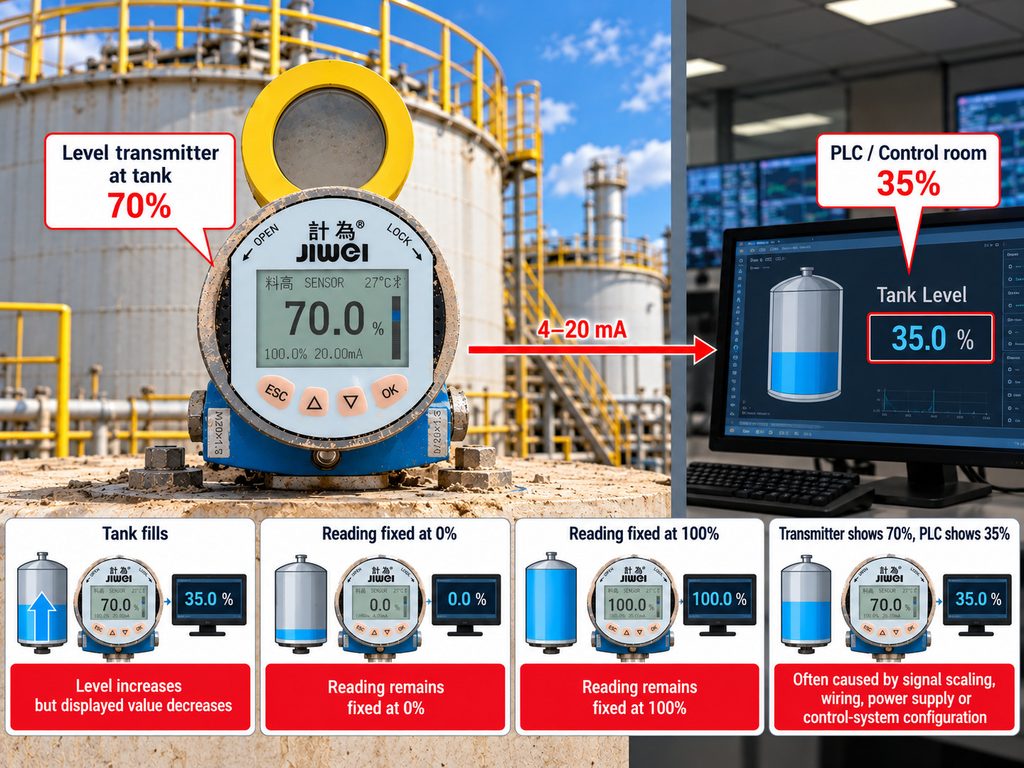
A level transmitter is working normally at the tank, but the control room shows the wrong value.
The transmitter displays 70%, while the PLC shows 35%.
Or the tank fills and the displayed percentage decreases instead of increasing.
Sometimes the reading remains fixed at 0% or 100%.
These problems are often blamed immediately on the level transmitter. In many cases, however, the real cause is signal scaling, wiring, power supply, or control-system configuration.
Start with the Basic 4–20 mA Relationship
In a conventional level application:
4 mA = 0%
20 mA = 100%
For a linear signal, the percentage can be calculated as:
Percentage = (Current − 4) / 16 × 100
For example:
12 mA corresponds to:
(12 − 4) / 16 × 100 = 50%
If the transmitter output is actually 12 mA but the PLC does not display approximately 50%, the problem may be downstream of the transmitter.
Problem 1: The PLC Scaling Is Wrong
A common configuration mistake is using the wrong raw input range.
The analog input module converts electrical current into a digital number. The exact raw value corresponding to 4 mA and 20 mA depends on the PLC and input-module configuration.
If the program assumes the wrong range, the displayed engineering value will also be wrong.
Check the analog input configuration before recalibrating the transmitter.
Problem 2: The Level Runs Backward
A top-mounted radar transmitter directly measures distance.
As the tank fills:
Level increases
but:
Distance decreases
If the control system interprets the distance signal as level without reversing the relationship, the display can move in the wrong direction.
The first question should therefore be:
Is the transmitter output configured for distance or level?
Problem 3: 4 mA and 20 mA Were Assigned to the Wrong Reference Points
Suppose the transmitter was configured so that 4 mA represents the upper reference point and 20 mA represents the lower reference point.
The output will appear reversed compared with a conventional level display.
This may be intentional in some applications, so do not change the configuration until the required control philosophy is confirmed.
Problem 4: Incorrect Zero and Span
A radar level transmitter needs correct tank-reference parameters.
These may include the empty distance, full distance, measurement reference point, blocking distance, and output range.
If the tank is six meters high but the transmitter or PLC is scaled for eight meters, the displayed percentage will not match the real level.
Problem 5: The Loop Does Not Have Enough Power
A two-wire 4–20 mA transmitter is powered through the current loop.
The loop must provide sufficient voltage for the transmitter and the total resistance of the connected devices.
Excessive cable resistance, barriers, isolators, indicators, or other loads can reduce the available voltage.
Possible symptoms include unstable current, incorrect readings, or transmitter restart.
Problem 6: Wiring Polarity or Terminal Errors
Before changing software parameters, inspect the physical loop.
Check the transmitter terminals, positive and negative polarity, analog input type, cable continuity, terminal blocks, isolators, barriers, and power supply.
A multimeter can be used by qualified personnel to determine whether the expected loop current is actually present.
Problem 7: The Analog Input Is Configured for Voltage Instead of Current
Some PLC input modules support both voltage and current signals.
If a 4–20 mA transmitter is connected while the channel is configured for 0–10 V input, the result will not represent the real level correctly.
Always verify the hardware and software configuration of the analog input channel.
Problem 8: The Transmitter Is Correct but the HMI Is Wrong
A PLC may contain the correct engineering value while the HMI displays another number.
This can happen when the HMI tag uses the wrong register, applies an additional scaling calculation, or displays a value from another instrument.
Troubleshooting should therefore follow the signal step by step:
Process → Sensor → Transmitter output → Wiring → PLC input → PLC scaling → HMI
Do not skip directly from the tank to the screen.
A Practical Troubleshooting Method
First, confirm the actual tank level using a safe and independent reference where possible.
Second, check the level displayed locally by the transmitter.
Third, measure or read the actual output current.
Fourth, compare the current with the expected 4–20 mA value.
Fifth, inspect the PLC raw input.
Finally, check PLC scaling and HMI configuration.
This approach identifies the stage at which the value becomes incorrect.
Do Not Recalibrate Too Early
One of the most common troubleshooting mistakes is recalibrating a correctly operating transmitter because the control-room value looks wrong.
If the transmitter locally shows the correct level and outputs the correct current, recalibration can create a second problem instead of solving the first one.
Always determine whether the error originates in measurement, signal transmission, scaling, or display before changing calibration parameters.
Conclusion
An incorrect level percentage does not automatically mean the level transmitter has failed.
4–20 mA level systems contain several stages, and an error can occur at any one of them.
By checking the actual process level, transmitter indication, loop current, PLC input, scaling, and HMI in sequence, technicians can locate the problem much faster.
The key principle is simple:
Verify the signal at each stage before adjusting the instrument.