Fireworks manufacturing involves a wide range of powdered and granular raw materials. During storage, conveying, batching, and feeding, reliable material level detection is important not only for production continuity but also for preventing overfilling, material shortages, spillage, and improper equipment interlocking.
In certain hazardous working areas, traditional maintenance methods may require personnel to approach the instrument, open the housing, inspect the device locally, or manually confirm parameters. These operations can increase the frequency with which personnel need to enter areas close to process equipment.

On May 4, 2026, a major explosion occurred at a fireworks manufacturing facility in Liuyang, Hunan Province, China. Following the accident, greater attention has been placed on mechanization, automation, digitalization, and reducing direct human exposure to hazardous operating areas in the fireworks industry.
To address material level monitoring requirements and improve instrument maintenance in such environments, Shenzhen Jiwei Automations Ltd. developed a Bluetooth-enabled solution based on the Tube-11 rod level switch.
The instrument combines proven vibrating rod level detection technology with wireless Bluetooth communication.
In addition to detecting high and low levels of powders and granular solids, operators can use the JW Tools mobile application to establish a Bluetooth connection with the instrument. Depending on the functions enabled for the device, users can check instrument status, configure parameters, and perform basic diagnostics without always having to operate directly at the instrument location.
1. Why Does Fireworks Material Level Detection Require Special Attention to Powder Properties?
Many raw materials used in fireworks manufacturing are powders or fine granular solids, including certain oxidizers, reducing agents, and other powdered ingredients.
Compared with large granules or bulk solids, powders may have a relatively low bulk density, variable flowability, dust generation, material buildup on vessel walls, and other handling characteristics.
For this reason, selecting a suitable powder level switch requires careful attention to minimum detectable material density, probe design, switching sensitivity, and adaptability to process conditions.
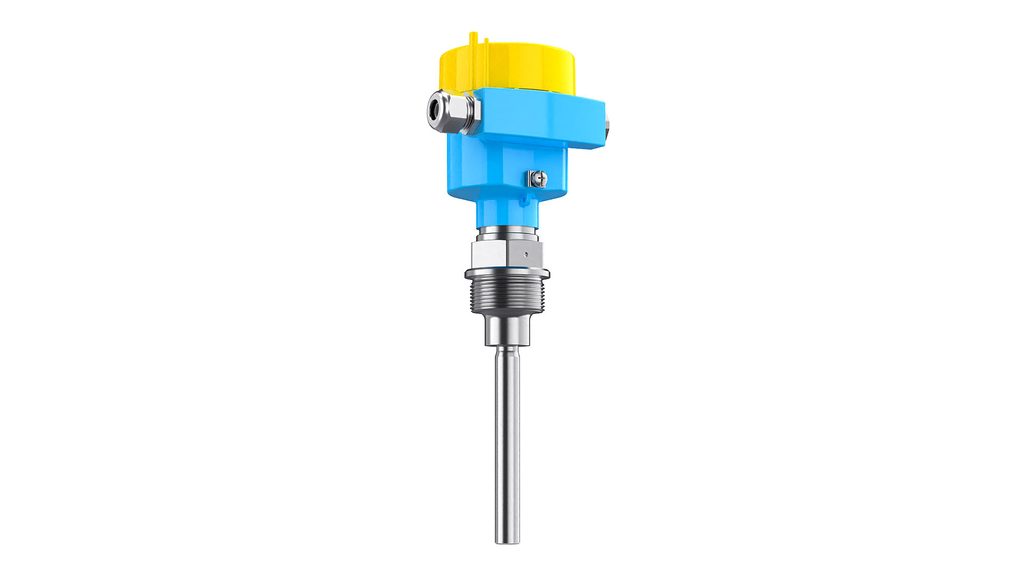
The Jiwei Tube-11 rod level switch uses a mechanical vibration measurement principle.
During normal operation, an internal piezoelectric drive system excites the dual-tube vibrating probe at a frequency of approximately 360 Hz.
When the probe is free and uncovered, the electronics detect a stable vibration condition.
When powder or granular material covers the probe, the vibration amplitude changes. The electronic module detects this change and determines that material has reached the installation point, after which the instrument outputs the corresponding switching signal.
Compared with certain measurement methods that depend heavily on dielectric constant, conductivity, or other electrical properties of the material, vibrating level detection is less dependent on these electrical characteristics.
This makes it suitable for a wide range of powders and granular solids.
It is important to note that the Tube-11 is a point level switch.
It determines whether material is present at the installation point. It does not continuously measure the full material level throughout the vessel.
Typical applications include:
High-level alarm in raw material silos;
Low-level or empty detection;
Overfill protection in hoppers;
Material presence detection in batching vessels;
Low-material detection in conveying systems;
Feeding equipment start/stop control;
PLC or DCS interlocking.
2. Minimum Detectable Density of 0.02 g/cm³ for Low-Density Powders
For powders and granular materials, minimum detectable density is one of the most important parameters when selecting a vibrating rod level switch.
If the material has a very low bulk density and the level switch is not sufficiently sensitive, the change in vibration after the material contacts the probe may not be large enough for reliable detection.
The Tube-11 can detect materials with densities as low as 0.02 g/cm³, expanding its suitability for lightweight powders and granular solids.
Typical technical specifications include:
| Item | Specification |
|---|---|
| Measured media | Powders and granular solids |
| Minimum material density | ≥0.02 g/cm³ |
| Probe vibration frequency | Approx. 360 Hz |
| Standard probe length | 125 mm |
| Probe diameter | 16 mm |
| Material contact response time | Approx. 0.5 s |
| Uncovered response time | Approx. 1 s |
| Process pressure | -1 to 16 bar |
| Standard process temperature | -50 to 150°C |
| High-temperature version | -50 to 250°C |
| Ambient temperature | -40 to 80°C |
| Protection rating | IP66/IP67 |
| Relay output | DPDT, 5 A / 253 V AC / 24 V DC |
| Two-wire power supply | 10 to 36 V DC |
| Probe and process connection material | 316L and other options |
The approximately 0.5-second response time after material contact allows the instrument to detect changes in material presence quickly.
The IP66/IP67 enclosure rating helps the instrument withstand dust, moisture, and other typical industrial environmental conditions.
The probe and process connection can be manufactured from 316L stainless steel, providing mechanical strength and suitable corrosion resistance for many applications.
The Tube-11 uses a compact dual-tube vibrating probe and can be mounted either from the top or from the side of a vessel, depending on the required detection point and process configuration.
For example, installation near the top of a silo can provide high-level or overfill alarm protection, while installation near the lower section of a hopper can be used for low-level detection, material shortage alarms, or refill control.
3. Why Add Bluetooth to a Vibrating Rod Level Switch?
The main purpose of a conventional vibrating rod level switch is simple: determine whether material is present or absent.
After installation, the device typically sends its status signal to a PLC, DCS, alarm system, or other control equipment via a relay or two-wire electrical connection.
This approach is suitable for automatic process control.
However, during installation, commissioning, parameter checking, or troubleshooting, maintenance personnel may still need to approach the instrument directly.
If the level switch is installed on top of a silo, at an elevated position, in a dusty area, or near a hazardous process zone, frequent direct access may increase maintenance difficulty.
For this reason, Jiwei has added Bluetooth communication capability to the Tube-11 vibrating level detection platform.
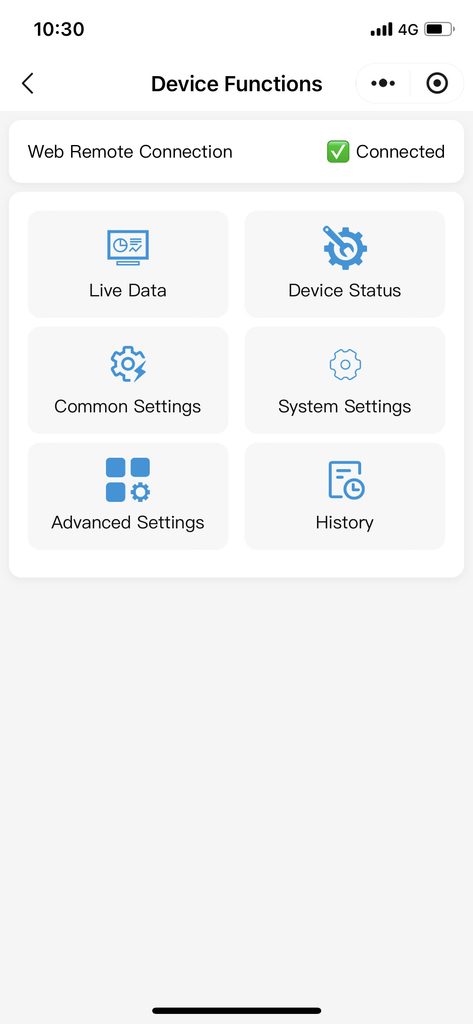
Operators can use an Android smartphone to download the JW Tools App from Google Play and connect wirelessly to supported Tube-11 devices using Bluetooth.
Once connected, users can access available device information, operating status, diagnostic data, and supported configuration functions.
The overall system can therefore be divided into three functional layers:
Tube-11 vibrating probe — field material detection;
JW Tools Bluetooth connection — device monitoring, configuration, and maintenance;
PLC/DCS — alarms, equipment control, and process interlocking.
Bluetooth does not replace the original vibrating level detection principle.
Instead, it adds a convenient wireless communication layer for maintenance and commissioning.
4. How to Connect the Tube-11 Bluetooth Rod Level Switch to JW Tools
For Tube-11 versions equipped with Bluetooth capability, the instrument can be connected through the JW Tools App.
The recommended procedure is as follows.
Step 1: Download JW Tools from Google Play and Open the App
First, open the Google Play Store on your Android smartphone.
Enter the following name in the search bar:
JW Tools
Find the JW Tools application, confirm the application name and developer information, and tap Install.
Wait for the application to download and install automatically.
After installation is complete, tap Open on the Google Play page, or return to the smartphone home screen and tap the JW Tools icon to launch the application.
When opening JW Tools for the first time, Android may request permission to access Bluetooth, nearby devices, or other related functions.
Allow the necessary permissions according to the system prompts. Without these permissions, JW Tools may not be able to discover nearby Jiwei Bluetooth-enabled instruments.
After completing these steps, the user can enter the JW Tools device connection and management interface.
Step 2: Turn On Bluetooth and Allow Nearby Device Permissions
After opening JW Tools, make sure Bluetooth is enabled on the Android smartphone.
If Bluetooth is disabled, turn it on through the phone’s quick settings menu or system settings.
Some Android versions also require the JW Tools App to have permission to access nearby devices before Bluetooth scanning can work properly.
Follow the operating system prompts and grant the necessary permissions.
Bluetooth operation does not mean that site safety rules can be ignored.
The smartphone and operator must still remain in areas permitted by the site’s safety management requirements.
Step 3: Search for Nearby Tube-11 Devices
Make sure the Bluetooth-enabled Tube-11 is properly powered.
In JW Tools, enter the device search or connection interface and allow the application to scan for nearby supported instruments.
If only one Bluetooth device is installed in the area, identification is usually straightforward.
If multiple Jiwei Bluetooth instruments are installed in the same location, verify the correct Tube-11 using the device name, instrument ID, serial number, or project installation records.
This is especially important when several level switches are installed on adjacent silos or hoppers.
Do not rely only on Bluetooth signal strength to identify the instrument.
Step 4: Select the Target Device and Establish a Bluetooth Connection
Locate the correct Tube-11 in the search results and select the device.
Wait while JW Tools establishes communication with the instrument.
After the Bluetooth connection is successful, verify the device number and installation location again before making any changes.
This helps prevent maintenance personnel from adjusting the wrong level switch on a nearby vessel.
If the connection fails, first confirm that the instrument is powered normally, then move the smartphone closer to the permitted operating position and scan again.
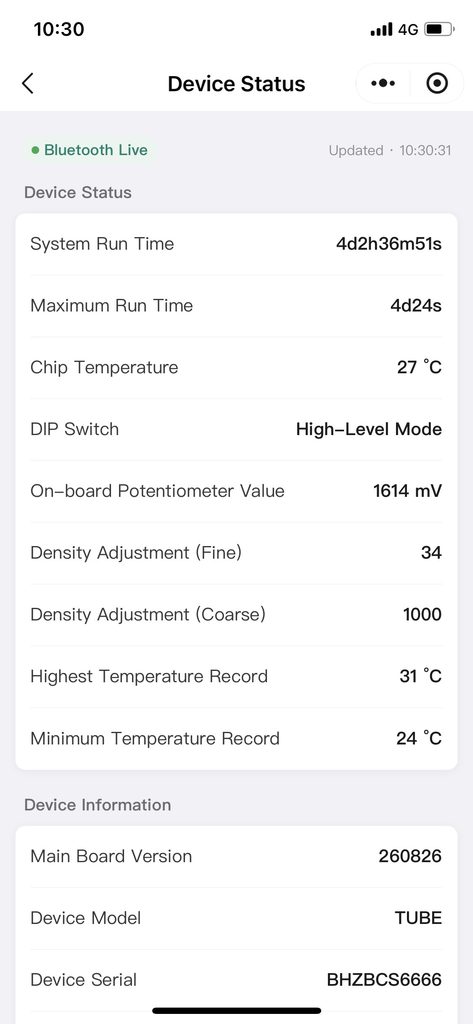
Step 5: Check Device Status and Operating Information
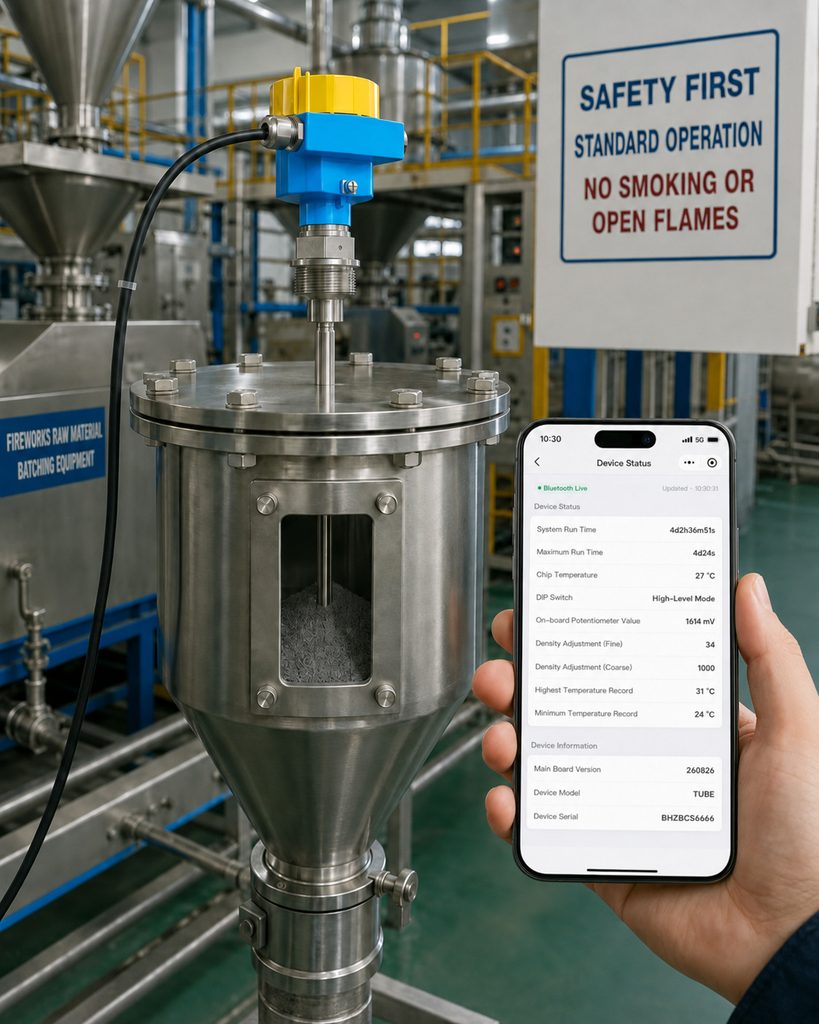
After the Bluetooth connection is established, users can view the available status and diagnostic information provided by the specific Tube-11 configuration.
During commissioning, technicians can compare the status displayed in JW Tools with the switching signal received by the PLC or DCS.
For example, first check the device status while the vibrating probe is uncovered.
Then allow the process material to cover the probe and verify whether the Tube-11 switches correctly and whether the control system receives the corresponding output signal.
This comparison can help determine whether a problem is related to the level switch itself, field wiring, process material conditions, or the PLC/DCS control system.
Step 6: Configure Parameters as Required
If the selected Tube-11 version provides parameter configuration functions through JW Tools, enter the appropriate configuration page.
Before changing any parameter, verify the device number, installation location, and the function of the parameter.
Parameters should not be changed experimentally if their purpose is not fully understood.
For hazardous production environments such as fireworks manufacturing plants, parameter changes should also follow the site’s equipment management and authorization procedures.
After completing the adjustment, save or confirm the configuration so that the new settings are properly written to the instrument.
Step 7: Verify the Output and End the Bluetooth Connection
After configuration or inspection is complete, perform a final functional check.
Verify the Tube-11 output under both material-present and material-absent conditions using the PLC, DCS, alarm system, or field control loop.
Once the device is confirmed to be operating normally, exit the current device page in JW Tools and disconnect the Bluetooth connection if required.
For facilities that maintain instrument service records, it is recommended to document the instrument number, inspection date, parameter changes, and final operating status for future maintenance and traceability.
5. What Should You Do If JW Tools Cannot Find the Tube-11?
If JW Tools cannot detect the Tube-11, several basic conditions should be checked.
First, confirm that the installed Tube-11 is actually a Bluetooth-enabled version.
A standard vibrating rod level switch without Bluetooth hardware cannot be detected by JW Tools.
Second, verify that the instrument is correctly powered.
The Bluetooth communication module generally requires the instrument to be operating normally before a connection can be established.
Next, check whether Bluetooth is enabled on the smartphone and whether JW Tools has permission to access Bluetooth and nearby devices.
If these conditions are correct, move closer to the instrument within the permitted operating area and scan again.
Industrial sites may contain large metal structures, silos, electrical cabinets, machinery, and other obstacles that can affect wireless signal propagation.
If multiple Bluetooth instruments are present, also confirm that the phone has not already connected to another device.
If repeated scans still fail to detect the Tube-11, review the product configuration and project documentation.
Contact Jiwei technical support if additional troubleshooting is required.
For instruments installed in hazardous locations, do not open the enclosure or modify electrical connections simply to troubleshoot Bluetooth communication unless such work is specifically permitted by the relevant safety procedures.
6. What Are the Benefits of Bluetooth Setup in Hazardous or Hard-to-Reach Locations?
In conventional industrial applications, Bluetooth mainly improves commissioning and maintenance efficiency.
In fireworks production and other environments where frequent direct access is undesirable, the benefits can be even more significant.
1. Reduced Need for Close-Range Instrument Access
Operators can check supported device information through JW Tools from an allowed operating position, reducing the need to approach the instrument every time a status check is required.
2. Fewer Unnecessary Enclosure Openings
Traditional devices may require the housing to be opened for certain inspection or configuration tasks.
If the relevant function can be performed via Bluetooth, some unnecessary enclosure-opening operations can be avoided.
3. Faster Commissioning
After a new instrument is installed, technicians can identify the device, check its status, and perform supported configuration functions using a smartphone without additional communication converters.
4. More Efficient Troubleshooting
If the PLC indicates an abnormal level status, maintenance personnel can first inspect the device information available through JW Tools.
They can then decide whether to check the probe, material conditions, power supply, wiring, or control system.
This helps narrow down the possible cause of the problem.
5. Suitable for Elevated or Inconvenient Installation Positions
Some vibrating rod level switches are installed on silo tops, vessel walls, or elevated process equipment.
Bluetooth communication allows part of the status checking and configuration work to be performed from a more convenient operating position.
7. Bluetooth Does Not Replace Explosion-Proof Design
One important point must be emphasized:
Bluetooth capability does not automatically mean that a Tube-11 can be installed in every hazardous area of a fireworks facility.
Bluetooth communication and explosion protection are two separate engineering considerations.
Instrument selection for hazardous environments must still take into account:
Hazardous area classification;
Properties of the combustible or explosive material;
Equipment protection level;
Explosion protection marking;
Process temperature;
Ambient temperature;
Power supply;
Electrical connection method;
Installation configuration.
For a customized Bluetooth Tube-11, the Bluetooth module, electrical design, power supply, enclosure, and explosion protection concept must be considered as a complete system.
Before final instrument selection, users should confirm:
Where the instrument will be installed;
The hazardous area classification;
The type of material being measured;
The minimum bulk density of the material;
Process temperature and pressure;
Whether high-level or low-level detection is required;
Whether relay output or two-wire output is required;
Whether the signal will be connected to a PLC or DCS;
Whether JW Tools Bluetooth configuration is required;
Where personnel are permitted to use mobile devices.
The final explosion protection method, Bluetooth function, and device configuration should always be selected according to the actual project conditions and the final technical documentation.
8. Where Can the Tube-11 Bluetooth Rod Level Switch Be Used?
In fireworks raw material handling and similar powder processing systems, the Tube-11 can be considered for several typical applications.
High-Level Detection in Raw Material Silos
When the material reaches the predefined level, the Tube-11 sends a switching signal.
The PLC can then stop the feeding equipment or activate a high-level alarm to reduce the risk of overfilling and spillage.
Low-Level Detection
When the material falls below the installation point, the instrument can generate a low-level or shortage signal.
This signal can be used to request refilling or start upstream conveying equipment.
Material Presence Detection in Batching Vessels
During automatic batching, a point level switch can confirm whether material has reached a defined location and provide an interlock condition for the next process step.
Intermediate Hopper Level Control
The Tube-11 can be used to determine whether an intermediate hopper is empty, low, or full and can be integrated with conveying or feeding systems.
Elevated or Difficult-to-Access Silos
These applications are particularly suitable for combining Tube-11 level detection with JW Tools Bluetooth communication.
In addition to fireworks production, the combination of vibrating detection and Bluetooth maintenance can also be applied to certain chemical, building material, environmental protection, new energy, and other industrial powder or granular material applications.
9. Tube-11 Bluetooth Rod Level Switch FAQ
Can the Tube-11 Continuously Display the Material Level in a Silo?
No.
The Tube-11 is a point level switch.
It determines whether material is present at the probe installation point.
If continuous material level measurement is required, a continuous level instrument such as a radar level transmitter may be more suitable, depending on the process conditions and material properties.
What Is the Minimum Material Density the Tube-11 Can Detect?
The Tube-11 can detect materials with densities as low as 0.02 g/cm³.
However, actual measurement performance should also be evaluated according to material characteristics, installation method, and process conditions.
Where Can I Download JW Tools?
Android users can open the Google Play Store and search for JW Tools.
After installing the application, open JW Tools and use Bluetooth to search for compatible Jiwei instruments.
Is a Data Cable Required to Connect JW Tools to the Tube-11?
Normally, no.
The smartphone communicates wirelessly with the Bluetooth-enabled Tube-11 using Bluetooth, so a USB or other data cable is not required for the Bluetooth connection.
Why Can’t JW Tools Find the Tube-11?
Possible reasons include:
The Tube-11 is not a Bluetooth-enabled version;
The instrument is not powered correctly;
Bluetooth is disabled on the smartphone;
JW Tools does not have permission to access nearby devices;
The smartphone is outside the effective Bluetooth range;
Metal structures or industrial equipment are affecting wireless communication.
Can a Bluetooth Tube-11 Be Installed in Any Fireworks Production Area?
No.
Whether the instrument can be installed in a specific hazardous area depends on the hazardous area classification, explosion protection requirements, and the certification and configuration of the final product.
Bluetooth capability itself does not replace explosion-proof design.
10. From Level Detection to Wireless Instrument Maintenance
As fireworks manufacturing and other industrial sectors continue to adopt greater levels of mechanization, automation, and reduced human exposure to hazardous areas, field instrumentation is also evolving.
A level switch is no longer limited to simply providing an “ON” or “OFF” material signal.
For maintenance personnel, the ability to check instrument status, access diagnostic information, and perform supported configuration functions wirelessly can improve commissioning and maintenance efficiency.
The core function of the Tube-11 remains reliable point level detection for powders and granular materials.
By adding Bluetooth communication through JW Tools, the instrument can also provide a more convenient way to support installation, commissioning, and maintenance.
The vibrating probe detects material presence.
JW Tools provides wireless device interaction.
The PLC or DCS performs process control and interlocking.
Together, these functions form a complete architecture of:
Field detection — wireless maintenance — automatic process control.
For fireworks raw material silos, batching vessels, intermediate hoppers, elevated equipment, dusty environments, and other locations where personnel should avoid unnecessary direct access, this approach provides both reliable point level detection and improved instrument maintenance convenience.
The exact Bluetooth functions, communication range, explosion protection type, configurable parameters, and JW Tools features available for the Tube-11 should be confirmed according to the actual project requirements and final product documentation.